operations
Can your cluster lose a node? Three checks before you drain
A drain that hangs and a replacement pod stuck Pending have the same two causes: a disruption budget that can never allow one, and requests nobody uses.
Your provider schedules a node reboot. You run kubectl drain, and one of two
things happens. Either the command sits there printing evicting pod ... over
and over and never finishes, or it finishes and you are left with pods stuck in
Pending that the cluster cannot place anywhere.
Both outcomes are predictable the day before. Neither is about CPU usage, which is why the dashboards look fine while it happens.
Check 1: the scheduler counts requests, not usage
The scheduler never looks at your CPU graphs. It subtracts requests from a node’s allocatable and asks whether the pod fits. That is the whole test.
kubectl describe node <node> | sed -n '/Allocated resources/,/Events/p'
Allocated resources:
  Resource           Requests      Limits
  cpu                2860m (74%)   5 (130%)
  memory             9542Mi (32%)  14Gi (48%)
Those percentages are of allocatable, not of capacity — allocatable is what is
left after the kubelet’s reserves. And they are reservations: a node can show
three quarters of its CPU spoken for while kubectl top node reports a tenth of
that in real use. The gap is not waste in the sense of money burned, it is
scheduling room that does not exist even though the CPU is idle.
That distinction is the same one behind throttling: a request is a share of the node, a limit is a ceiling, and neither is a measurement. We pulled that apart in CPU requests vs limits.
To see the reservation and the usage side by side for a whole cluster:
kubectl get pods -A -o custom-columns=\
NS:.metadata.namespace,POD:.metadata.name,\
CPU:.spec.containers[*].resources.requests.cpu --no-headers | sort -k3 -h | tail -20
Then compare the worst offenders with kubectl top pod -A --sort-by=cpu. Where
a workload reserves most of a core and uses a fiftieth of one, you have found
the room you are missing.
What a drain actually does
kubectl drain is not a delete. It cordons the node, then calls the eviction
API once per pod, and eviction is the only Kubernetes verb a
PodDisruptionBudget can refuse. A refusal is a 429, and drain retries it
forever, which is why a hung drain looks like a network problem and is not one.
Check 2: budgets that can never allow an eviction
kubectl get pdb -A
NAMESPACE  NAME         MIN AVAILABLE  MAX UNAVAILABLE  ALLOWED DISRUPTIONS
prod       api          2              N/A              1
prod       ops-api      1              N/A              0
prod       ops-portal   1              N/A              0
ALLOWED DISRUPTIONS: 0 is the number that matters, and it means two very
different things depending on the pods behind it:
- Pods are unhealthy. The budget is doing its job: it will allow a disruption as soon as the workload recovers. Fix the workload.
- Every pod is healthy and it still allows nothing. The budget is arithmetically unsatisfiable. It will never allow anything, and any drain touching those pods hangs until someone edits YAML at 3 a.m.
The second shape is a configuration mistake with two common forms. One replica
with minAvailable: 1 is the classic: the only pod is also the last pod, so it
can never be evicted. minAvailable equal to the replica count is the same
mistake written differently.
The fix is a choice, not a formula. Either the workload deserves a second
replica, in which case add it, or it does not, in which case say so with
maxUnavailable: 1 and let it bounce during maintenance.
# every budget that permits nothing while its pods are healthy
kubectl get pdb -A -o json | jq -r '
  .items[]
  | select(.status.disruptionsAllowed == 0
           and .status.currentHealthy >= .status.desiredHealthy
           and .status.expectedPods > 0)
  | "\(.metadata.namespace)/\(.metadata.name)"'
Run that before an upgrade window, not during one.
Check 3: only some of it has to move
The question is not “does this node’s load fit elsewhere”. It is “does the part that reschedules fit elsewhere”, and those differ more than you would think.
- DaemonSet pods do not move. They exist because the node exists, and they leave with it. Counting them makes the projection look worse than reality.
- Pods pinned by node affinity, a node selector or local storage do not move either, but here the news is worse: they do not come back until the node does.
- Everything else needs somewhere to land, and it lands by requests.
So the arithmetic is: the sum of movable requests on the node you are about to
lose, against the sum of allocatable − requested on every remaining ready
node. If the first number is bigger, the drain will finish and leave you with
Pending pods, and the event will say Insufficient cpu — the message we took
apart in 0/3 nodes are available.
A two-node cluster is the sharpest version of this, because “the others” is one node, and the half of the cluster you are keeping is already carrying its own half.
Doing it before the window, not during
None of the three checks is hard. They are just tedious enough that nobody runs them on a normal Tuesday, which is why they get discovered during maintenance.
This is the screen we built for it in KubeGlance, because we kept doing the arithmetic by hand:
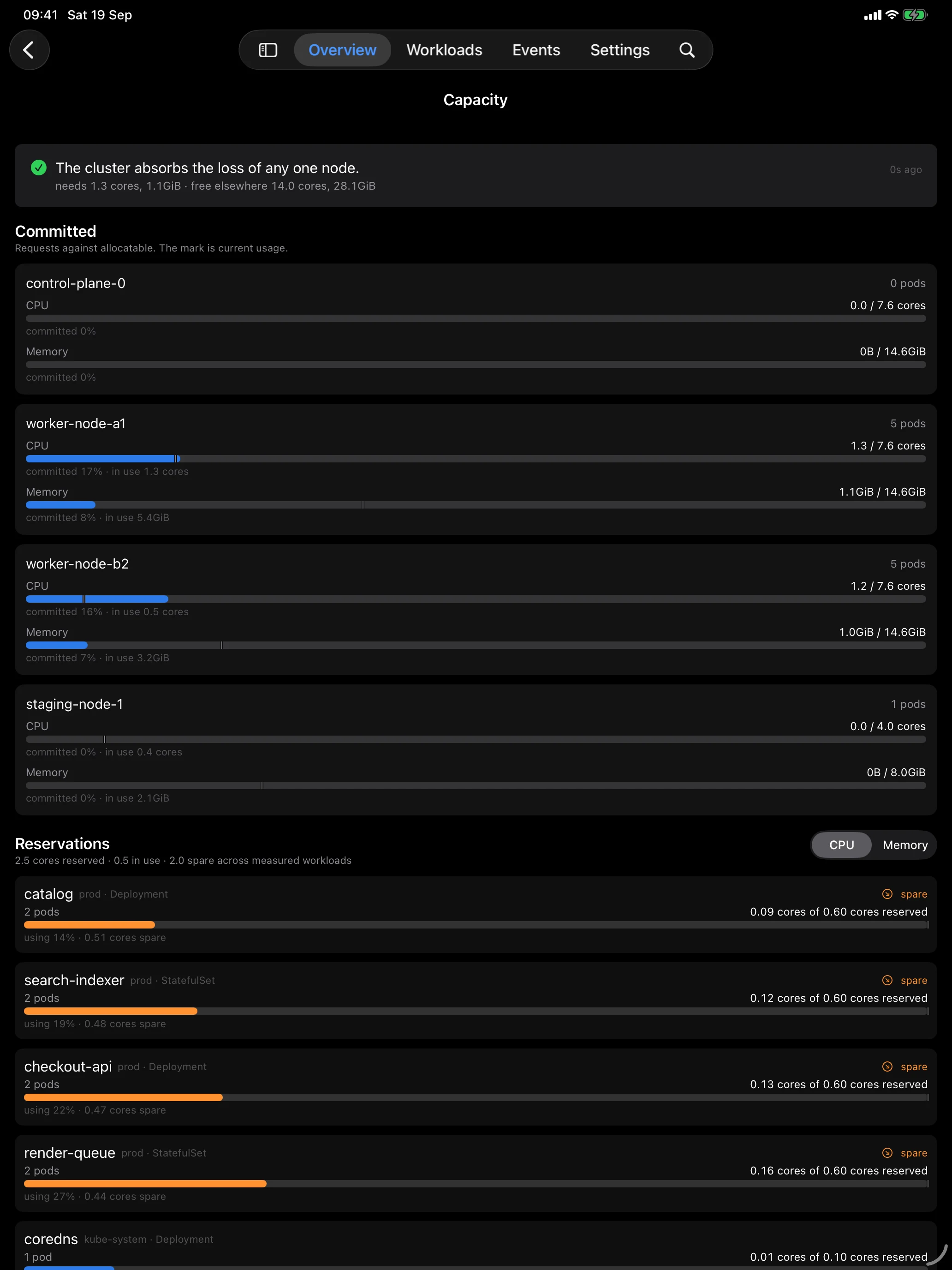
The verdict at the top is check 3 done continuously. The per-node bars are check 1, with usage as a mark so the gap between reserved and used is visible rather than inferred. The ranking underneath is where the room comes from: workloads sorted by the reservation nothing is using, which is usually a much shorter list than you expect, and usually the same five names every time.
The pre-flight list
Before any node goes away on purpose:
- No budget allows zero while its pods are healthy. Fix the unsatisfiable ones first, because that is the failure that hangs rather than fails.
- Movable requests on the doomed node fit in the free room on the others. Not usage. Requests.
- Anything pinned to that node is something you can live without for the length of the reboot, because it is not coming back before the node does.
And if check 2 fails, resist the urge to --disable-eviction. That flag deletes
pods instead of evicting them, which means it ignores every budget in the
cluster — including the ones that are protecting something real.
The Kubernetes dashboard that fits in your pocket
KubeGlance is a native Kubernetes client for iPhone and iPad — the real dashboard, not a companion — with a full Mac app on the same core. Pods, workloads, logs and events, straight from your kubeconfig.
Download KubeGlance