troubleshooting
DNS i/o timeout after a default-deny NetworkPolicy: the egress rule you need
"lookup … on 10.96.0.10:53: i/o timeout" after a default-deny NetworkPolicy: why DNS breaks while pods stay Ready, and the rule that fixes it.
If every name lookup in a namespace started timing out right after someone
applied a NetworkPolicy, the policy cut off DNS. A pod that a policy isolates for
egress may only send traffic the policies list, and a default-deny lists nothing,
so lookups to CoreDNS count too. Every query is dropped, the resolver waits out
its timeouts, and the application reports a name it cannot resolve. Pods carry on
Running and Ready the whole time.
The fix is one more policy: allow egress to the CoreDNS pods, on port 53, over UDP and TCP. Two versions of it look right and do not work. Both are below.
The fastest check
Run a lookup from inside an affected pod:
kubectl exec -n shop deploy/checkout -- nslookup payments
On Kubernetes 1.36.1 with Calico 3.31.4 (Canal), after a default-deny egress policy:
;; communications error to 10.96.0.10#53: timed out
;; communications error to 10.96.0.10#53: timed out
;; communications error to 10.96.0.10#53: timed out
;; no servers could be reached
The same failure, in the words of whatever is asking:
| Client | What it prints | Time to fail |
|---|---|---|
Go program (net resolver) | lookup payments on 10.96.0.10:53: read udp 10.244.1.7:38923->10.96.0.10:53: i/o timeout | 40.0 s |
curl | curl: (6) Could not resolve host: payments | 11.3 s |
getent hosts payments (glibc) | nothing; exit status 2 | 10.0 s |
dig / nslookup (BIND 9.18) | ;; communications error to 10.96.0.10#53: timed out | 15.0 s |
busybox nslookup (in an ephemeral container) | ;; connection timed out; no servers could be reached |
A Go service usually prints that line with its own prefix, such as
dial tcp: lookup payments on 10.96.0.10:53: …. The part to recognise is a
read that timed out against your cluster DNS address on port 53.
Then compare what you see with what the cluster says:
kubectl get pods -n shop
kubectl get networkpolicy -n shop
NAME                        READY   STATUS    RESTARTS   AGE
checkout-67779ccf47-8m59d   1/1     Running   0          8m55s
payments-6b46c5746-2j4v6    1/1     Running   0          8m55s

NAME                  POD-SELECTOR   AGE
default-deny-egress   <none>         8m43s
Everything is green, and there is a policy with an empty pod selector. That
combination is the answer. A pod that stays Ready while its application cannot
reach anything is a family of problems of its own, covered in
pod Running but not Ready. Here the probe passes
because the kubelet’s probe comes in to the pod, and the policy only restricts
what goes out.
If the image has no shell or no lookup tools, an ephemeral container shares the pod’s network namespace, so the same policy applies to it:
kubectl debug -n shop checkout-67779ccf47-8m59d --profile=general --image=busybox:1.37 \
  -c dnscheck -- nslookup payments.shop.svc.cluster.local
kubectl logs -n shop checkout-67779ccf47-8m59d -c dnscheck
kubectl debug needs a pod name. It rejects deploy/checkout with
"apps/v1, Kind=Deployment" not supported by debug.
Why it happens
The Kubernetes documentation says it in a caution box under Default deny all egress traffic: “A default deny-all egress policy also blocks DNS traffic.” The policy that causes it is the one most guides start with:
apiVersion: networking.k8s.io/v1
kind: NetworkPolicy
metadata:
  name: default-deny-egress
  namespace: shop
spec:
  podSelector: {}
  policyTypes:
  - Egress
podSelector: {} selects every pod in the namespace. policyTypes: [Egress] with
no egress rules isolates them for egress and allows nothing. NetworkPolicies are
additive allow lists: once a pod is isolated, a connection passes only if some
policy that selects the pod allows it. A DNS query is a connection like any
other.
What makes it confusing is how the failure looks from inside the pod:
Three details in that sequence explain everything you see:
- The drop is silent. No ICMP error and no TCP reset come back, so the
resolver cannot tell a blocked query from a slow server. It waits the whole
timeout and retries. glibc’s defaults are a 5-second
timeoutand 2attempts(resolv.conf(5)), which is the 10 secondsgetenttook above. Go’s resolver does not stop at the first timeout: it moves on through thendots:5search list, and took 40 seconds to give up on one short name. Each request that needs a fresh lookup pays those seconds before it fails, so the first symptom is often latency or upstream timeouts rather than a clear error. - The pod looks healthy. Nothing in the pod’s status reflects which policies select it. If the application exits when a lookup fails at startup, you get CrashLoopBackOff instead, and the logs say “could not resolve”, which reads like a DNS outage rather than a policy.
- The destination has already been rewritten. The pod sends to the kube-dns
Service IP (
10.96.0.10here), and kube-proxy translates that to one CoreDNS pod’s IP before the packet leaves the node. On Canal the policy is checked after that rewrite. That is why the first “obvious” fix below does nothing.
The fix: allow egress to the CoreDNS pods, UDP and TCP
apiVersion: networking.k8s.io/v1
kind: NetworkPolicy
metadata:
  name: allow-dns
  namespace: shop
spec:
  podSelector: {}
  policyTypes:
  - Egress
  egress:
  - to:
    - namespaceSelector:
        matchLabels:
          kubernetes.io/metadata.name: kube-system
      podSelector:
        matchLabels:
          k8s-app: kube-dns
    ports:
    - protocol: UDP
      port: 53
    - protocol: TCP
      port: 53
Apply it next to the default-deny, not instead of it. Policies add up, so the deny still blocks everything else. On the same cluster, a minute later:
$ dig +short payments.shop.svc.cluster.local
10.96.217.27
$ dig +tcp +short payments.shop.svc.cluster.local
10.96.217.27
What each part does:
kubernetes.io/metadata.name: kube-systemselects the namespace by name. The control plane sets this label on every namespace, and you cannot remove or change it (Targeting a Namespace by its name). Any other namespace label is one somebody has to remember to add.namespaceSelectorandpodSelectorin the same list item means pods labelledk8s-app=kube-dnsinkube-system. Written as two items (a-in front of each), they would mean anything inkube-system, or any pod labelledk8s-app=kube-dnsin this namespace, which is a different and much wider rule.k8s-app: kube-dnsis the label kubeadm, kind and most distributions give the CoreDNS pods. The Service is namedkube-dnsfor historical reasons. Check yours before relying on it:Whatever that prints is what the rule’skubectl get svc -n kube-system kube-dns -o jsonpath='{.spec.selector}'podSelectormust say.
Once DNS works, the error changes. The same curl now fails with
curl: (28) Connection timed out after 10003 milliseconds. That one is the
default-deny doing its job on the actual connection to payments, which needs
its own allow rule.
The fixes that look right and do not work
Allowing the Service IP with ipBlock
  egress:
  - to:
    - ipBlock:
        cidr: 10.96.0.10/32
On our Canal cluster this left every lookup timing out, exactly as before. The
policy sees the CoreDNS pod’s address, not 10.96.0.10. The Kubernetes docs do
not promise either behaviour: whether address rewriting “happens before or after
NetworkPolicy processing” is not defined, and “may be different for different
combinations of network plugin, cloud provider, Service implementation”
(Network Policies).
A rule that selects the DNS pods works on any plugin. A rule for the Service IP
works on some.
UDP only
The same rule with only the UDP port:
$ dig +short payments.shop.svc.cluster.local
10.96.217.27
$ dig +tcp +short payments.shop.svc.cluster.local
;; Connection to 10.96.0.10#53(10.96.0.10) for payments.shop.svc.cluster.local failed: timed out.
;; no servers could be reached
Most lookups go over UDP, so this passes a quick test. A response too large for a UDP packet, such as a long list of addresses for a headless Service, comes back truncated, and the resolver then asks again over TCP. That TCP query is blocked, so the failure only appears for some names, some of the time. RFC 7766 is blunt about it: “All general-purpose DNS implementations MUST support both UDP and TCP transport.” Allow both.
Forgetting the other end
A policy in your own namespace is not the only one that can cut DNS. A
default-deny for ingress in kube-system isolates the CoreDNS pods, and
breaks DNS for every namespace in the cluster, including ones with no policies
at all. From a namespace without a single policy, after
default-deny-ingress was applied in kube-system:
$ dig +short +time=2 +tries=1 web.np-b.svc.cluster.local
;; communications error to 10.96.0.10#53: timed out
;; no servers could be reached
If you lock down kube-system, the CoreDNS pods need an ingress rule allowing
UDP and TCP 53 from every namespace (namespaceSelector: {}).
Finding it before it bites
There is no kubectl view of “which pods are egress-isolated without DNS”, but
the policies themselves hold enough to narrow it down. This lists every policy
that restricts egress, with the DNS protocols it allows:
kubectl get networkpolicy -A -o json | jq -r '.items[]
  | select(any(.spec.policyTypes[]?; . == "Egress"))
  | [.metadata.namespace, .metadata.name,
     ([.spec.egress[]?.ports[]? | select(.port == 53 or .port == "dns" or .port == "dns-tcp") | .protocol // "TCP"]
      | unique | join(",") | if . == "" then "-" else . end)]
  | @tsv' | column -t
shop  allow-dns            TCP,UDP
shop  default-deny-egress  -
A namespace whose lines all end in - restricts egress and allows DNS nowhere.
That is a strong hint, not a proof. Policies select pods by label, so an allow
rule can exist and still miss the pod that needs it, and a rule with no ports
allows every port to its peers. The proof is a lookup from the pod itself, as in
the first section. Run it after every policy change, not only when something
breaks.
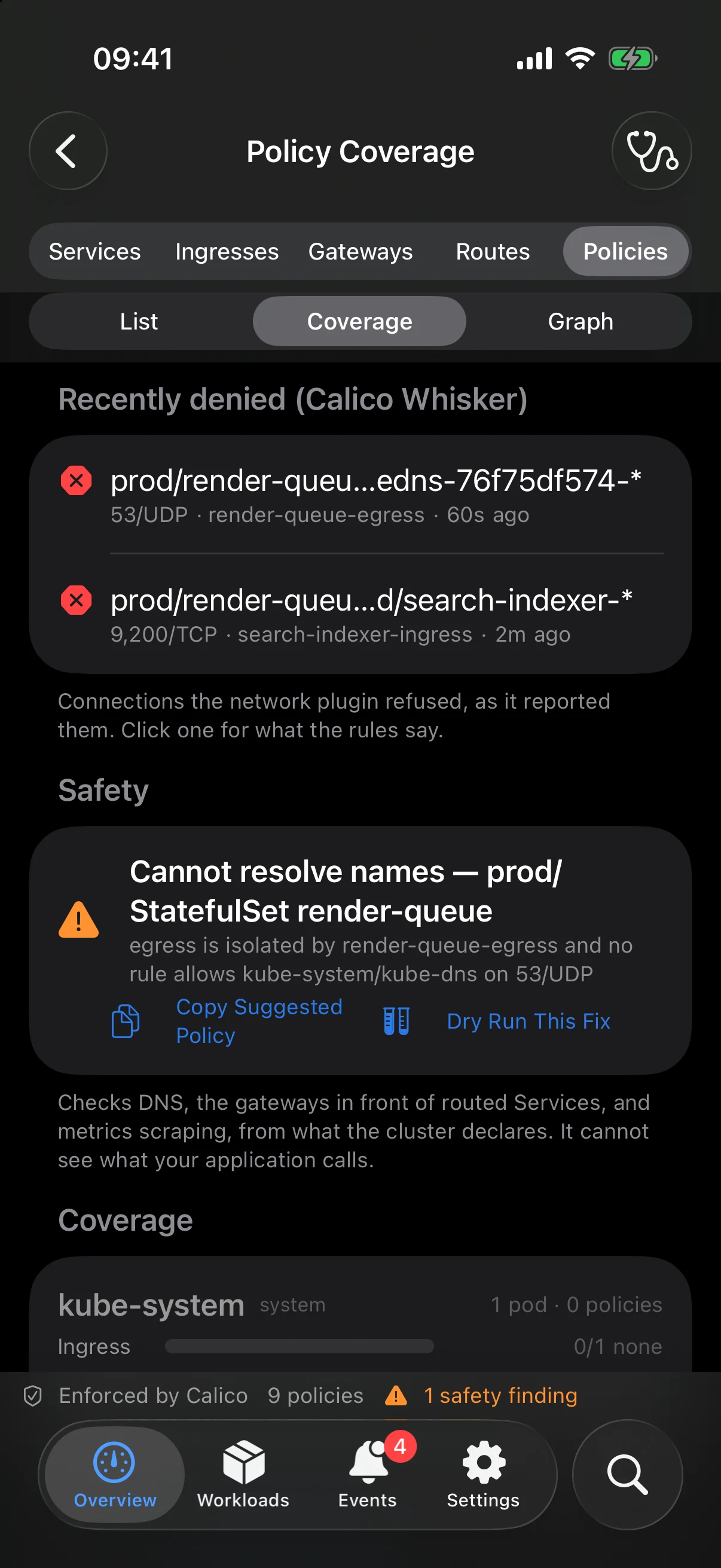
KubeGlance runs this check for you. Its network policy coverage view works out which pods every policy selects, and flags any workload that egress isolation has cut off from the cluster’s DNS pods, naming the policy responsible. It suggests a fix, and lets you dry-run it against the cluster’s current pods before you apply it. Where Calico Whisker runs, the denied lookups show up there as well.
A default-deny that cut off DNS leaves every pod Running and Ready. KubeGlance is a native Kubernetes client for iPhone and iPad, with a full Mac app on the same core. It shows which pods each NetworkPolicy selects, answers "can A reach B?" step by step, and flags workloads a policy has cut off from DNS.
Get KubeGlanceThe Kubernetes dashboard that fits in your pocket
KubeGlance is a native Kubernetes client for iPhone and iPad — the real dashboard, not a companion — with a full Mac app on the same core. Pods, workloads, logs and events, straight from your kubeconfig.
Download KubeGlance